Fashion Business CRM – Google Sheets + AppSheet Integration
This repository documents the full workflow, logic, screenshots, and implementation steps for building a lightweight Customer Relationship Management (CRM) System for a fashion business using:
- Google Sheets (Backend Database)
- AppSheet Web App
- AppSheet Mobile App
- Connected tables: Customers, Measurements, Orders
- Phone Number as the Primary Key to link all related records
📌 Overview
This CRM allows the business to:
- Register customers once (using Phone Number as a unique identifier)
- Automatically attach and retrieve customer measurements
- Track and view all orders linked to each customer
- Search for a customer and instantly see:
- Customer profile
- Related measurements
- Order history (past & ongoing)
This system works seamlessly on the web and mobile via AppSheet.
📸 Screenshots
Customer Details View
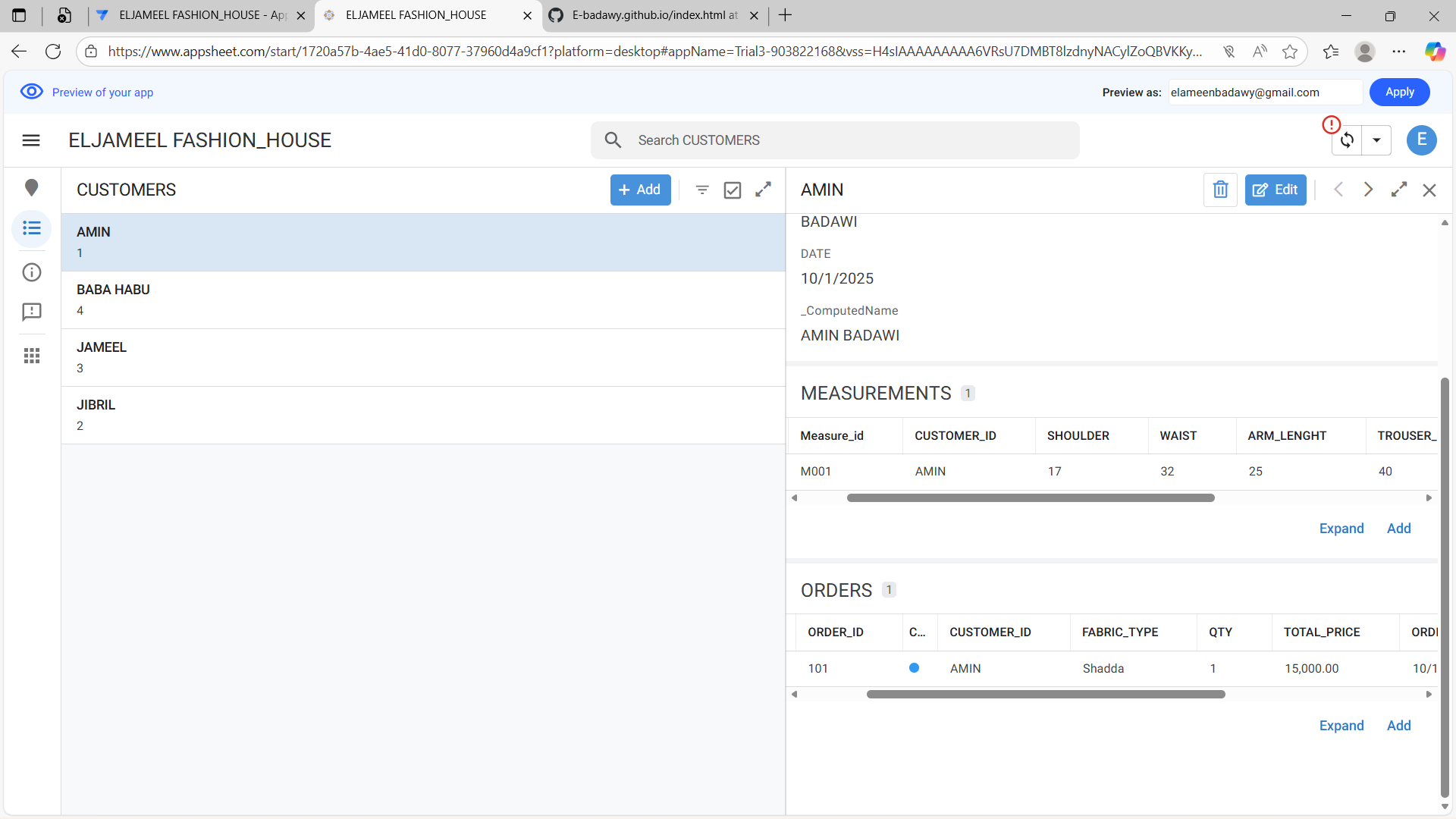
phone number search view
🏗️ System Requirements
1. Google Sheets
- A Google Workspace or free Gmail account
- 3 Sheets with the following structure:
Sheet 1: Customers
| Column |
Description |
| PhoneNumber (PK) |
Unique identifier |
| FullName |
Customer full name |
| Gender |
Male/Female |
| Address |
Optional |
| DateCreated |
Auto timestamp |
Sheet 2: Measurements
| Column |
Description |
| MeasurementID |
Unique key (AppSheet generated) |
| PhoneNumber (FK) |
Links to Customers.PhoneNumber |
| Shoulder |
Numeric |
| Chest |
Numeric |
| Neck |
Numeric |
| Sleeve |
Numeric |
| DateTaken |
Auto timestamp |
Sheet 3: Orders
| Column |
Description |
| OrderID |
Unique |
| PhoneNumber (FK) |
Customer placing order |
| StyleType |
e.g. Kaftan, Suit, Native |
| Fabric |
Optional |
| Price |
Numeric |
| Status |
Pending / Completed |
| DeliveryDate |
Date |
| DateOrdered |
Auto timestamp |
🔧 AppSheet Configuration Logic
1. Connecting the Sheets
In AppSheet:
Data → Tables → Add Data → Google Sheets
Connect:
- Customers
- Measurements
- Orders
2. Setting Primary Keys
- Customers Table → Key =
PhoneNumber
- Measurements Table → Key =
MeasurementID
- Orders Table → Key =
OrderID
This ensures AppSheet can relate each measurement and order to the correct customer.
3. Establishing Relationships
In AppSheet:
Customers Table
AppSheet auto-generates:
Related Measurements = REF_ROWS("Measurements", "PhoneNumber")
Related Orders = REF_ROWS("Orders", "PhoneNumber")
Measurements Table
PhoneNumber → Ref → Customers.PhoneNumber
Orders Table
PhoneNumber → Ref → Customers.PhoneNumber
This creates automatic parent-child linking.
4. Search Function Logic
AppSheet automatically creates a global search bar.
Searching by:
- Name
- Phone number
- Order details
- Measurement fields
…returns all customer-related records.
To ensure clean output, set:
UX → Views → Primary View: Customers
And enable:
Show related tables inline
This ensures that when you open a customer:
- Customer details appear at the top
- Below are:
- Related Measurements
- Related Orders
📱 Mobile App Behaviour
On the mobile AppSheet app:
- Search bar filters customer table
- Selecting a customer opens:
- Measurement summary
- Order history
- Add New Measurement button
- Add New Order button
All automatically linked via the PhoneNumber primary key.
🧠 Workflow Diagram
Add your diagrams under /workflow/:
- CRM Architecture
- Data Flow (Google Sheets → AppSheet → Mobile App)
- Relationship Diagram (PK/FK structure)
Upload them and replace this placeholder:
workflow/crm_architecture_diagram.png
🚀 How to Deploy Your Own Version
1. Prepare your Google Sheets
- Create the three tables above
- Maintain PhoneNumber as unique
2. Create a New AppSheet App
AppSheet → Start with Data → Google Sheets
- Customers (primary)
- Measurements (inline view)
- Orders (inline view)
4. Test Search Function
- Search for a number or name
- Ensure measurements & orders appear beneath customer profile
📝 Notes & Best Practices
- Use Data Validation in Google Sheets to avoid duplicate phone numbers
- Enable AppSheet Form Save Events for automatic timestamps
- Consider adding:
- Image upload for fabric samples
- WhatsApp API link for instant customer messaging
- PDF invoice generation
📬 Author
Designed and implemented by Badawi Aminu Muhammed (Cigma General Solutions)
Data/BI Analyst | Project & Operations Manager
LinkedIn: https://linkedin.com/in/elameenbadawy
📄 License
This documentation is provided for portfolio and educational purposes.